
v0.3 · macOS · Windows · Linux
Database client built for confidence.
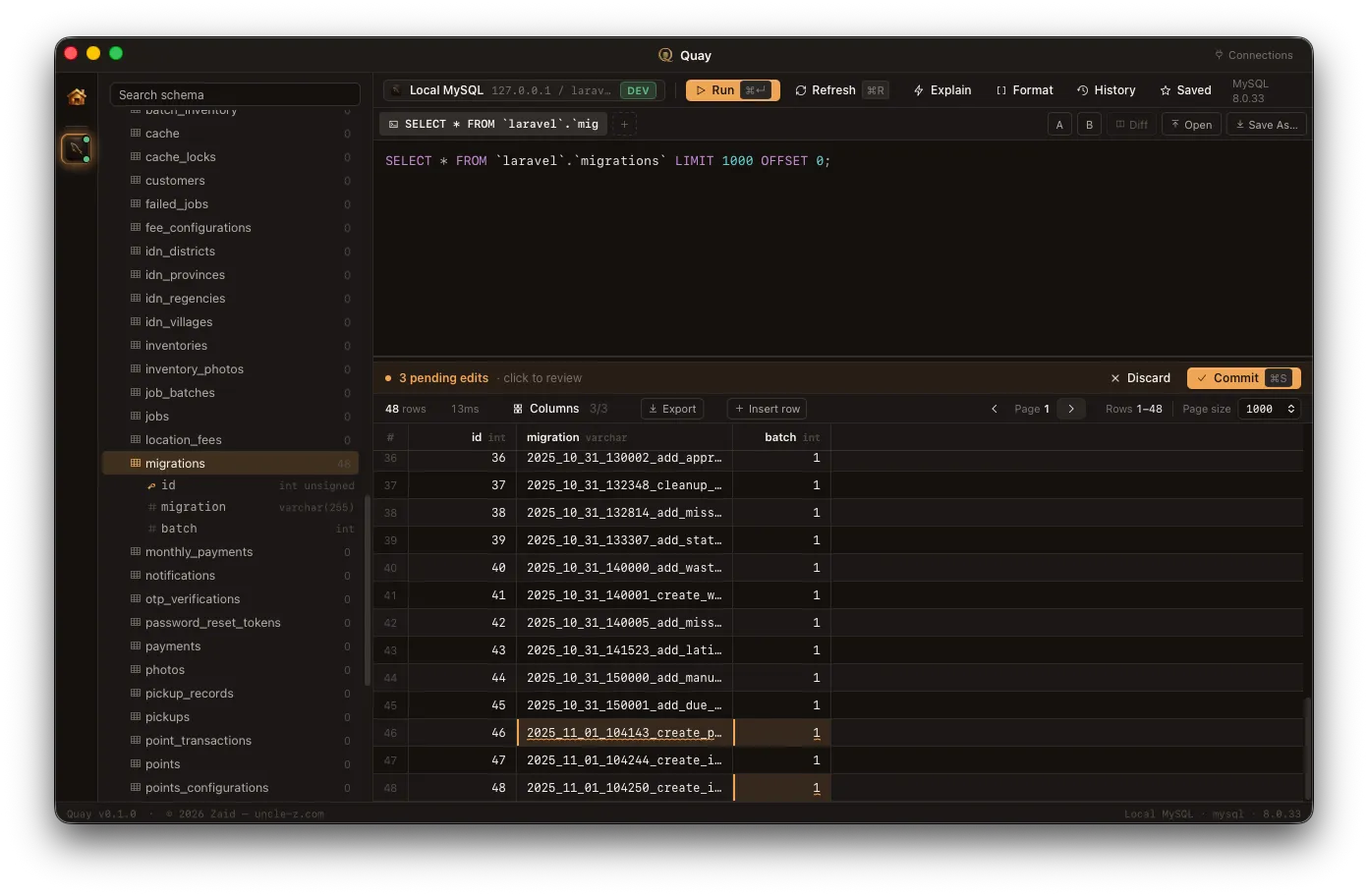
Quay is a native cross-platform client for 35 engines — relational (PostgreSQL, MySQL/MariaDB, SQLite, SQL Server, Oracle), columnar (DuckDB, ClickHouse, Snowflake, BigQuery, Redshift), document + KV (MongoDB, Redis, DynamoDB, Couchbase), wide-column (Cassandra, ScyllaDB), graph + vector + time-series, and more. Every edit — cells, JSON fields, Redis keys — stages into a draft buffer. Type the connection name to commit on production. Same flow across every engine.
Native on macOS, Windows, and Linux.
One client. 35 engines.
Core SQL — Free
-
 PostgreSQL
 -
 MySQL
MySQL -
 MariaDB
 -
 SQLite
 -
 SQL Server
 -
 DuckDB
 -
 ClickHouse
Wire-compat presets — Free (postgres / mysql protocol)
-
 CockroachDB
 -
 YugabyteDB
 -
 Neon
Neon -
 Supabase
 -
 TimescaleDB
 -
 Redshift
 -
 Aurora-PG
 -
 Greenplum
 -
 Citus
Citus -
 TiDB
TiDB -
 PlanetScale
 -
 Aurora-MySQL
 -
 Vitess
NoSQL · Cloud · Specialty · Vector — Pro
-
 MongoDB
 -
 Redis
Redis -
 Cassandra
 -
 Snowflake
 -
 BigQuery
 -
 Databricks
 -
 Elasticsearch
 -
 InfluxDB
 -
 Neo4j
Neo4j -
 DynamoDB
 -
 Firestore
 -
 Memcached
 -
 Qdrant
 -
 Weaviate
 -
 Pinecone
How it works
Four steps from connect to commit.
- 01
Connect
Add a connection or pick a saved one. SQLite asks for a file path; the others want host, port, and credentials. Tag it dev/staging/prod — the tag changes how Quay protects the connection later.
- 02
Browse
One rail spans every engine — databases, tables, collections, and Redis keys. Right-click anything for actions: backup, restore, indexes, columns, copy to another connection.
- 03
Edit
Every change — a cell, a JSON field, a Redis hash, a list member — stages into a per-session pending buffer. Multi-tab SQL editor for parallel queries; query history is persistent.
- 04
Commit
Review the diff. ⌘S to commit, ⌘R to refresh. On a production connection you type the connection name first. Every time.
Inside Quay
See it in action.
Real screenshots from the latest build. Ten engines, one workflow, every diff visible before commit.
-
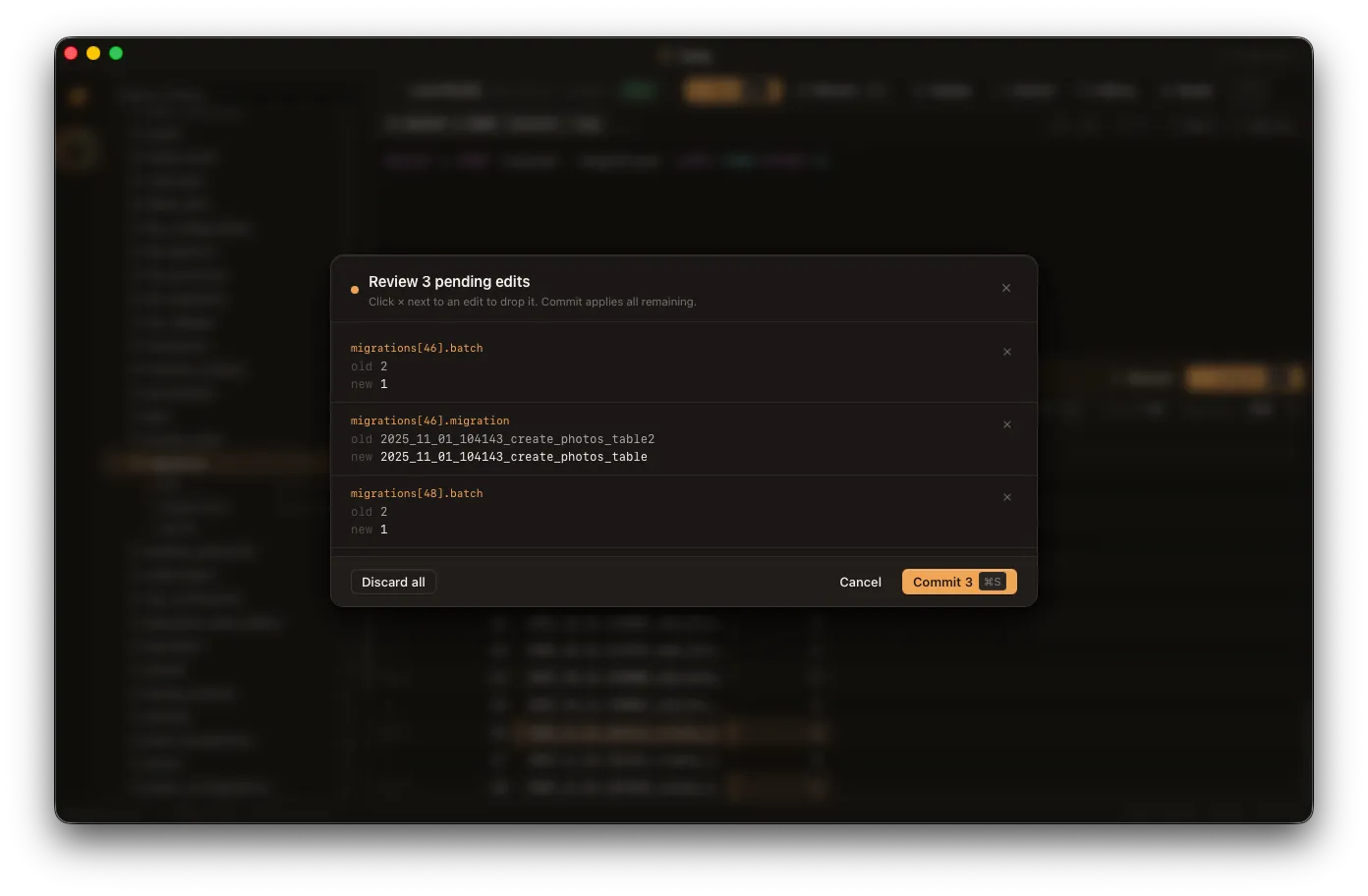
Review modal — every old → new diff before commit -
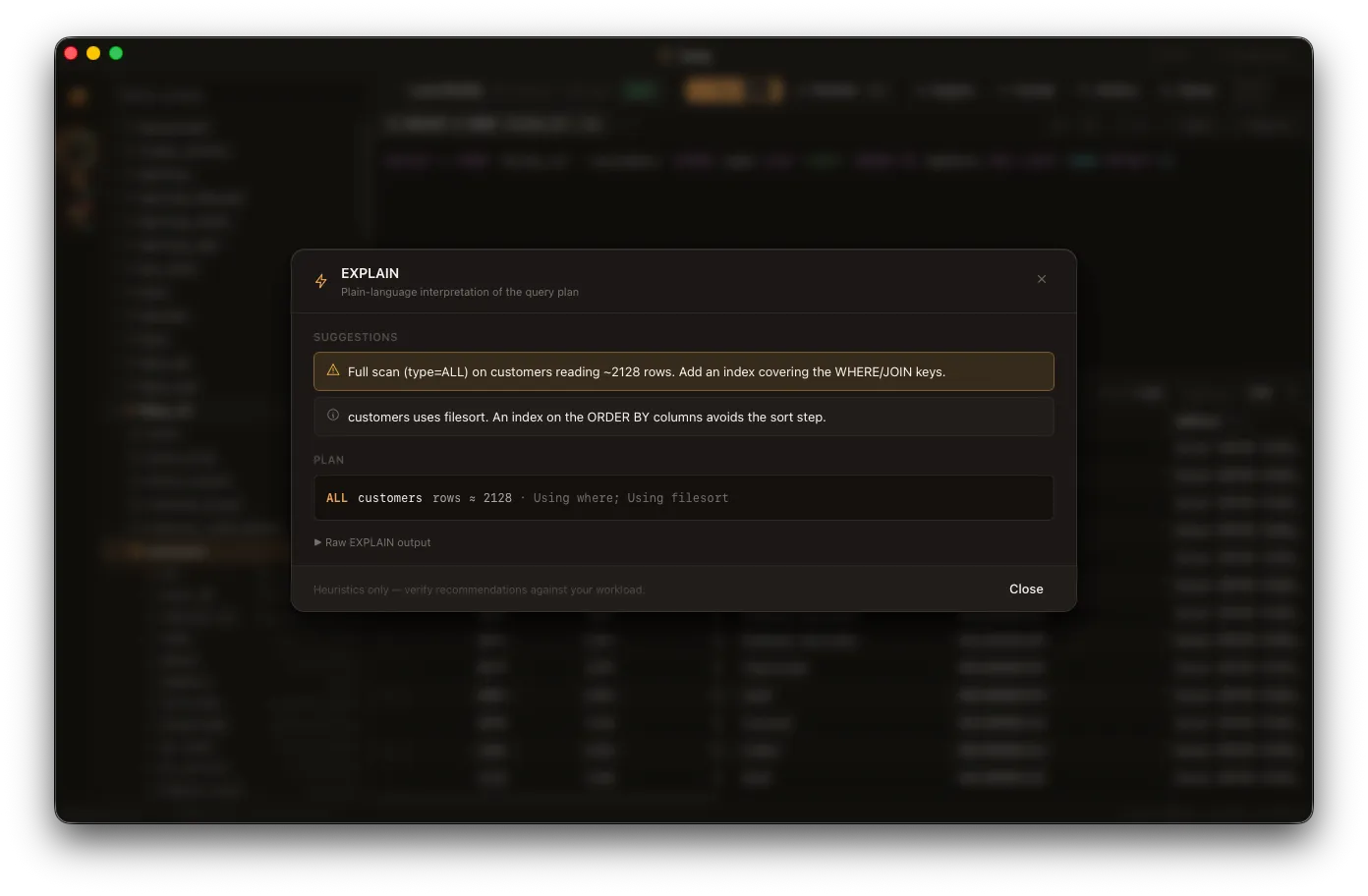
EXPLAIN — plain-language interpretation, no AI -
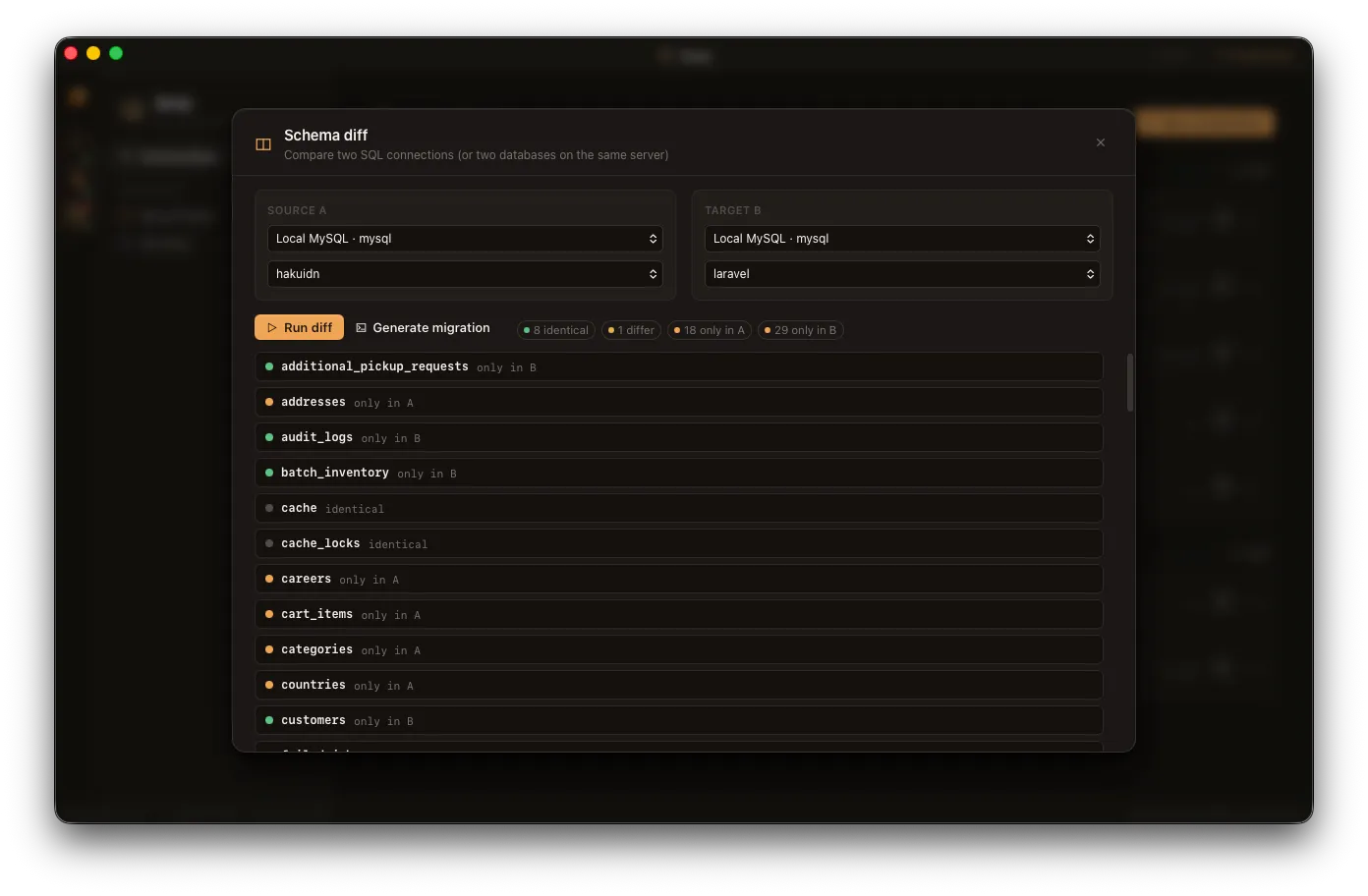
Schema diff — side by side, identical or different per object -
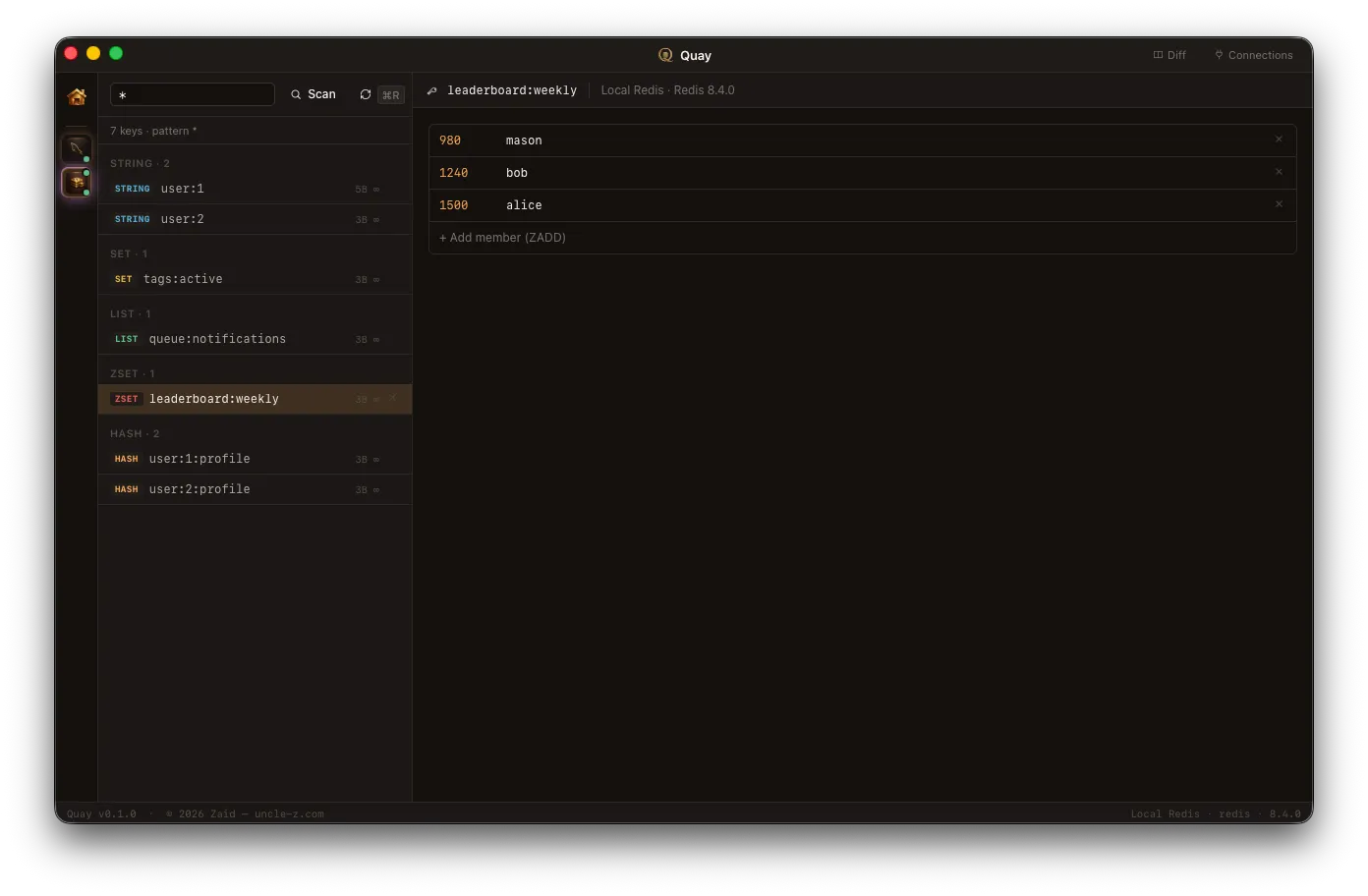
Redis browser — type-aware viewers for strings, hashes, lists, sets, zsets
Features
The boring, handled.
Quay is opinionated about the parts of the workflow nobody likes. So you don't have to be.
-
Restore-safe SQL exports
Foreign-key topological order. Charset and collation preserved. AUTO_INCREMENT and sequences intact. Triggers, views, and routines emitted in dependency order. Round-trip verified — MySQL, Postgres, and SQLite each have an integration test that exports → drops → reimports a real schema.
-
Encrypted backups (.qenc)
Single-file envelope: AES-256-GCM with an Argon2id-derived key. Auth tag on every blob, so tampering or wrong passwords fail fast. Restore picks up .qenc automatically — paste the password, Quay decrypts, then runs the import.
-
Edit as draft
Cells, JSON fields, Mongo documents, Redis hash/list/set/zset members — every change stages into a session-scoped buffer. Review the diff. ⌘S commits all. ⌘R refreshes.
-
Production feels different
Typed-name confirmation gates every commit to a prod-tagged connection — pending edits, raw INSERT/UPDATE/DELETE, ALTER TABLE, CREATE/DROP INDEX, restore, copy table. The friction is the feature.
-
35 engines, one feel
Free covers 20 engines — 7 core SQL backends (Postgres, MySQL, MariaDB, SQLite, SQL Server, DuckDB, ClickHouse) plus 13 wire-compat presets (Cockroach, Yugabyte, Neon, Supabase, Timescale, Redshift, Aurora-PG, Aurora-MySQL, Greenplum, Citus, TiDB, PlanetScale, Vitess). Pro adds 15: NoSQL (Mongo, Redis, Cassandra), cloud warehouses (Snowflake, BigQuery, Databricks), specialty (Elasticsearch, InfluxDB, Neo4j, DynamoDB, Firestore, Memcached), and the vector trio (Qdrant, Weaviate, Pinecone). Same context menus, same edit-as-draft, same review modal, same shortcuts across every one.
-
Schema diff between connections
Pick two open SQL connections. Quay walks every table, surfaces tables present on only one side, and per-column diffs the rest — type, nullability, primary key, default. Side-by-side, no SQL needed.
-
EXPLAIN with plain-language interpretation
Run any SELECT, click Explain. Quay parses the dialect-specific plan (MySQL row format, Postgres FORMAT JSON, SQLite QUERY PLAN) and surfaces the issues — full scans, filesort, missing indexes — with concrete suggestions. Deterministic. No AI.
-
Result grid that works like a spreadsheet
Click row index to select; ⇧-click ranges; ⌘-click toggles. Same for columns. Right-click for: copy as TSV/JSON/SQL, export selection (CSV/JSON/SQL/Markdown/NDJSON), DELETE rows by primary key, sort by column, hide columns.
-
Multi-tab editor, history, saved queries
Run several queries in parallel — each tab keeps its own SQL. History is persistent per connection (last 200, deduplicated). Star a query to save it under a name; reload from the Saved dropdown.
-
Native, zero CLI dependency
Quay implements every export, import, EXPLAIN, and structure operation natively. No mysqldump, pg_dump, mongodump dependency. The optional Pro Plus AI assistant is the only network call out of the data path — and it's off by default and uses your own API key, never Quay's.
-
SSH tunneling that stays alive
Connect through any bastion. Quay forwards a random local port to the remote DB and routes the driver through it. Auth via key file, password, or your existing ssh-agent. TOFU host-key verification (known_hosts persisted to ~/.config/quay). Background keepalives every 30 seconds — when the bastion stops answering the connection chip flips to a danger pill so you know to reconnect before issuing a query.
-
Streaming import, never out-of-memory
Multi-GB SQL backups stream through a state-machine splitter at 1 MB chunks — Quay never holds the whole script in RAM. A live progress bar shows bytes scanned, statements executed, and statements failed in real time, so a long restore looks like work, not a hang.
-
Restore preview before you click
Pick a backup file and Quay scans it before the import runs — counts of CREATE TABLE, ALTER, INSERT, COPY, and the destructive ones (DROP, TRUNCATE) flagged in danger color. The FK-ordered table list from Quay's own export header is laid out so you see the blast radius up front.
-
Postgres deep tools — LISTEN/NOTIFY, RLS, extensions, replication
Live LISTEN/NOTIFY tail (sqlx PgListener — real streaming, not polling). Extension manager listing every available + installed extension. Materialized views with REFRESH from the SQL editor. Replication slots viewer to surface stalled or unused slots. RLS policies across every schema. pg_stat_statements top-queries panel.
-
MySQL & MariaDB — triggers, events, performance schema
Triggers and scheduled events listed across every schema. Performance schema top-digest panel sorted by total time. Master / replica status. mysql.user list (run SHOW GRANTS in the editor for per-user grants). Read-side coverage today; editable panels in the next release.
-
MongoDB — aggregation runner, change streams
Aggregation pipeline runner: paste stages as JSON, run against any collection. Change streams live tail (cluster-, db-, or collection-scoped) — backed by a real watch() subscription, not polling.
-
Redis — pub/sub tail, CLUSTER, ACL, INFO
Live SUBSCRIBE / PSUBSCRIBE tail with channel filter and pause. CLUSTER NODES topology view. ACL LIST viewer. INFO + CLIENT LIST for snapshotting connection state during incidents.
-
ClickHouse — MergeTree parts, mutations, distributed
MergeTree parts inspector. Mutations panel with one-click KILL MUTATION. Distributed clusters listing. TTL inspector showing engine + key configuration per table.
-
Cassandra / ScyllaDB — ALLOW FILTERING parser, ring, compaction
ALLOW FILTERING parser explains why a query would need a full scan + suggests a safer rewrite, before you fire it. Token ring + peers view. Compaction strategy listing per table.
-
SQL Server — T-SQL trace, Agent, sys.sql_modules
Stored procedure trace mode (Pro Plus) — the body gets auto-instrumented with PRINT breadcrumbs, run once, returns the trace in order. No engine extension. Agent jobs viewer. Stored procedures browseable from sys.sql_modules.
-
DuckDB — extensions, settings, functions
Extension manager listing every extension (httpfs for S3, json, parquet, fts). Settings panel exposing every config knob. Table-function browser for ad-hoc queries against external data sources.
-
SQLite — pragmas, WAL toggle, attached DBs
Pragma panel surfacing the most-asked-about settings in one shot. WAL ↔ DELETE journal-mode toggle (Pro Plus). Attached-databases listing.
-
Cloud DWs — Snowflake, BigQuery, Databricks, Redshift
Pro tier. Snowflake warehouse manager with one-click suspend / resume + query history. BigQuery dry-run cost estimator (bytes processed → dollar cost before you run) + datasets / jobs panels. Databricks warehouses + query history. Encrypted backups support all four.
-
Vector databases — Qdrant, Weaviate, Pinecone
Pro tier. Collections / indexes browser. Vector similarity search panel — paste a query vector, pick top-K, see matches with their scores + payload. Run vector queries with the same draft buffer and prod-confirm safety as your SQL writes — surprisingly few clients treat vectors as first-class.
-
Specialty — Elasticsearch, InfluxDB, Neo4j, DynamoDB, Firestore, Memcached
Pro tier. Each engine's native command shape (DSL, Flux/SQL, Cypher, PartiQL, Firestore REST, memcached text) gets its own editor mode plus a dedicated deep-tools panel — Elastic mappings + snapshots, Influx buckets, Neo4j Cypher with autocomplete chips, DynamoDB DescribeTable, Firestore composite indexes, Memcached live STATS at 1 Hz.
-
Team sync — shared encrypted connections + queries
Pro Plus. Connection profiles and saved queries sync across your team, end-to-end encrypted client-side (server stores ciphertext only). Workspaces let you scope what's shared. Roles control who can edit prod connection definitions.
-
Scheduled cloud backups
Pro Plus. Recurring backups directly to S3, R2, or GCS. Per-connection cron schedule. Email or webhook alerts on missed runs. Weekly integrity-check summary reports.
-
AI assistant — opt-in, BYO key, non-AI fallback always
Pro Plus. Natural-language SQL generation, query explanation, index suggestion. Off by default. Bring your own OpenAI / Anthropic / Ollama key — your queries never go to a Quay-controlled LLM. Every AI feature has a deterministic non-AI fallback so you're never blocked by AI being unavailable, slow, or just wrong.
-
Migration tooling — native runner, zero external CLI
Pro Plus. Versioned up/down SQL files in your project, applied in transaction order against any connection. Tracking table managed for you. Generate migrations from a schema diff. Audit history of every applied change. No Flyway / Liquibase / Sqitch dependency — ships with Quay.
Use cases
Built for the work most clients hand off to a CLI.
-
Restoring after an incident
Bring production back from a dump without manual SQL editing — FK-ordered, charset-preserved, optional .qenc decryption.
-
Editing production data safely
Stage, review, type the connection name, commit. Same pattern across SQL, Mongo, and Redis.
-
Catching schema drift
Diff dev, staging, and prod side-by-side. Per-column type / nullability / PK / default differences surfaced in one pass.
FAQ
Questions, answered.
-
Which databases does Quay support?
35 engines in total. Free tier (20): 7 core SQL — PostgreSQL, MySQL, MariaDB, SQLite, SQL Server, DuckDB, ClickHouse — plus 13 wire-compat presets — CockroachDB, YugabyteDB, Neon, Supabase, TimescaleDB, Redshift, Aurora-PG, Aurora-MySQL, Greenplum, Citus, TiDB, PlanetScale, Vitess. Pro tier adds 15: NoSQL (MongoDB, Redis, Cassandra/ScyllaDB), cloud warehouses (Snowflake, BigQuery, Databricks), specialty (Elasticsearch/OpenSearch, InfluxDB, Neo4j, DynamoDB, Firestore, Memcached), vector (Qdrant, Weaviate, Pinecone).
-
When can I use it?
Quay is shipping today on macOS, Windows, and Linux — head to Downloads for the latest signed builds.
-
Which platforms is Quay on?
macOS, Windows, and Linux — all three from day one. Quay is built on Tauri, which compiles each platform into a native app. The database layer is identical across platforms; chrome (titlebar, menus, file dialogs) follows each OS's conventions.
-
What's in an encrypted backup?
A single file with a 4-byte magic, version, 16-byte salt, 12-byte AES-GCM nonce, and the ciphertext + auth tag. Key derivation is Argon2id (m=64 MiB, t=2). Wrong password and tampered files fail fast. There is no recovery without the password — Quay never escrows it.
-
Will it cost money?
Three tiers. Free covers 20 SQL dialects (7 core engines + 13 wire-compat presets), the SQL editor, schema browser, plain backup/restore, and the per-engine deep tools for the SQL family. Pro ($14.99/mo) adds the 15 NoSQL / Cloud / Vector dialects and the safety-critical features (edit-as-draft, prod-tag confirmations, FK-aware backup, restore preview, streaming import, EXPLAIN tips, schema diff, SSH health monitoring, encrypted backups). Pro Plus ($29.99/mo) adds team sync, cloud backup destinations, scheduled backups, opt-in AI, the native migration runner, and the stored-proc debugger. Lifetime licenses available. See the [Pricing page](/pricing) for the full breakdown.
-
Does Quay use AI?
No. Every operation — exports, EXPLAIN interpretation, schema diff, slow-query suggestions — is deterministic. No LLMs, no API keys, your schema and queries never leave your machine. If optional AI features are ever added, they'll be off by default with non-AI fallbacks.
-
Do I need mysqldump or pg_dump installed?
No. Quay implements export and import natively in Rust — that's why backups round-trip on the first try regardless of which CLI is on the host. Official CLIs can be wired in as an optional fast path, but they're never required.